User Account Settings - Editing Decimal Places for Measurement Types

User Account Settings - Editing Decimal Places for Measurement Types

Set Decimal Place Counts for Volume in Strayos

1. Navigate to the Units settings

2. Click "Edit decimal place counts"

3. Click Measurement Types and then "add"

4. Choose "Measurement Type"

5. Choose the type from the drop down

6. Choose unit preference

7. Choose unit

8. Choose decimal place count
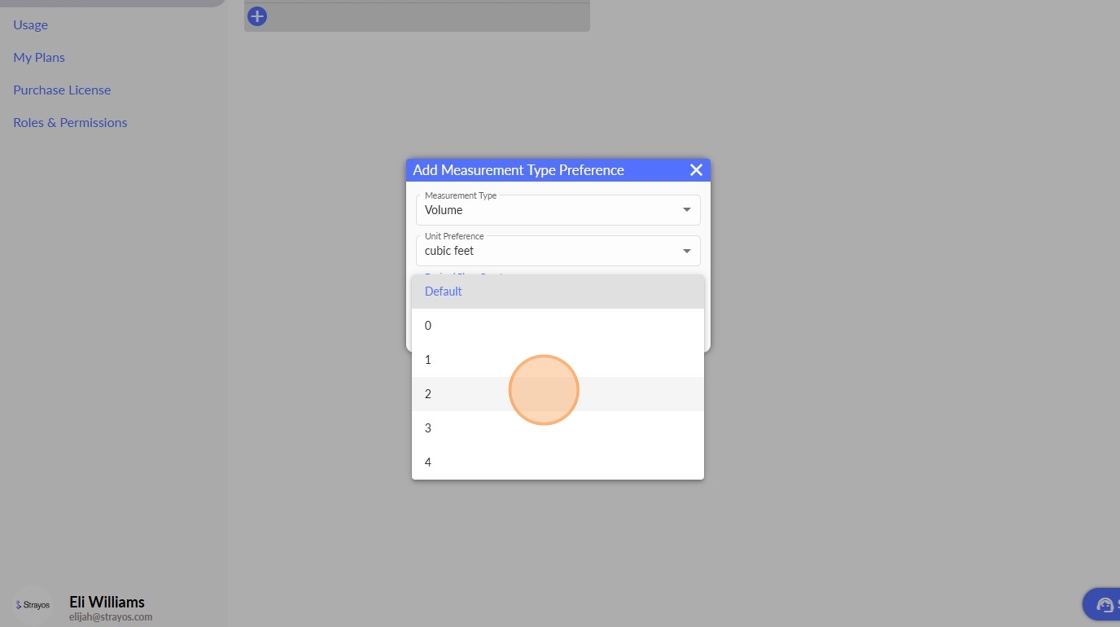
9. Click "Save"


    • Related Articles

    • How to Change Fragmentation Measurement Settings

      Strayos offers several ways to customize Rock Colors and Rock Diameter Calculations in the fragmentation module. Users can choose between these settings in their site settings, pictured below. Once the settings are enabled, it will be used for new ...
    • Measurement Offset Tool

      Strayos allows its users to offset measurements within projects by a specified distance entered by a user. To utilize this function, follow the steps below: 1.) After drawing a measurement on the model, right-click on the measurement to display the ...
    • Strayos Fielder - User Guide

      Strayos Fielder User Guide Product Overview Strayos Fielder is a mobile application, collectively aimed to streamline the drilling process, improve communication and collaboration, enhance data management, and provide real-time insights into drilling ...
    • 3D Shot Volume Measurement

      Design the drill pattern Set up the drill pattern using your preferred method. Note: Ensure subdrill and floor elevations are set correctly as shot volume will exclude subdrill You may need to enter a backbreak value > 0 when setting up the AB line. ...
    • Editing Haul Roads

      With the Strayos Haul Road AI tool, haul roads are automatically detected, along with some of their physical characteristics. This document will walk through how to edit the detected haul roads when edits need to be made. First, open the project and ...